
Frequently Asked questions
How do I download my product(s)?
- Once your purchase is completed, the checkout page will appear.
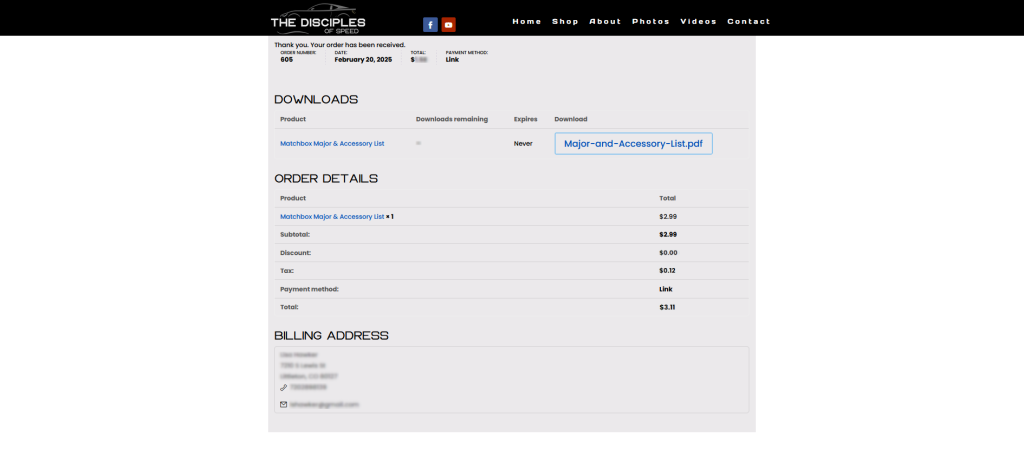
- Click the blue button(s) with your product name(s) below Download on the right (Pictured: Major-and-Accessory-List.pdf).
- Unless it’s a zip file (the Collectors’ Access Database is our only product in zip file format), your purchased PDF will open in your browser.
- Click the save/download button top right (see video below for a demonstration).
How do I print my product(s)?
- Download and save the PDF to your computer, (not your mobile device) per the instructions under HOW DO I DOWNLOAD MY PRODUCT(S)?
- Please note there is a limit of two downloads from the shop for each product, so it’s very important to save the file somewhere you can find it easily in the future.
- You’ll need a program that supports PDFS, such as Adobe Acrobat (which is free).
- Open the program, click File>Print. Then set your printer (your Canon, Lexmark, etc.), set the number of copies, and set the print size to “Actual Size,” “Page Scaling-None,” or something similar. Double check your print preview, then click print.
- Print out the PDF.
- You can print one-sided or double-sided.
- You can print at home, at your local printer, or an online printer (e.g., Office Depot, VistaPrint, FedEx).
why do you need my address for digital products?
Your address is needed for billing purposes. We will never sell, rent, trade, or otherwise misuse your information. We do not keep a record of your address.
How do I open a zip file?
- Double-clicking the ZIP file will un-zip it and create a new folder with the same name at the same location.
How do I use the Collectors' Microsoft Access Database?
- Works on PC only.
- There are many tutorials online on how to use Access.
- Microsoft Access is included as part of Microsoft 365 Family or Personal, Microsoft 365 Apps for business, and Microsoft 365 Business Standard subscriptions. Access is a Windows application that runs on PCs only.
Explainer video below.
Do my download links expire/have a download limit?
- Each product has a download limit of 2, so be sure to save your product in a safe, easily findable place on your computer.
Can I download your products on my phone?
While you may browse and purchase from any version of our site, you can download your purchases on a mobile device, but we don’t necessarily recommend it.
I need a new download link because I lost my link, my computer broke and I lost all my files, etc.
If you lose your link and need a new one within 45 days of your purchase, just contact us. After that point, it is our policy not to provide new download links. We suggest that you backup your files in the cloud or on an external device for safety.
what are your terms of use?
- Licensing: The Disciples of Speed purchases are for a single user for personal use.
- Permitted uses:
- All downloadables/printables are for Personal/Non-Commercial use.
- You are allowed to make copies for yourself only. You are not permitted to make copies for others.
- You agree not to sell, distribute, duplicate, publish, modify, create derivative works, or give any of our resources to anyone else. This includes featuring materials in any recorded/live session or distributed via any online marketplace.
- You agree not to upload any of this information to the internet, social media, or a shared drive that can be accessed by others.
- If you have any questions regarding the terms, please email us.